• Go To Website
  • Go To Website
home/Knowledge Base/Professional Business Mail/Keep your mailbox clean and ordered
Popular Search:Reseller Hosting, VPS Hosting, Professional Mail

Keep your mailbox clean and ordered

Updated on December 5, 2022

A mailbox full of old messages, makes difficult to find the really important messages, forcing us to manually select and delete them or to request an upgrade of available space.

But now you can keep your mailbox clean by setting up the auto cleanup for specific folders!

Put the less important messages in a folder with auto cleanup feature and the they will be automatically deleted after the time interval you choose.
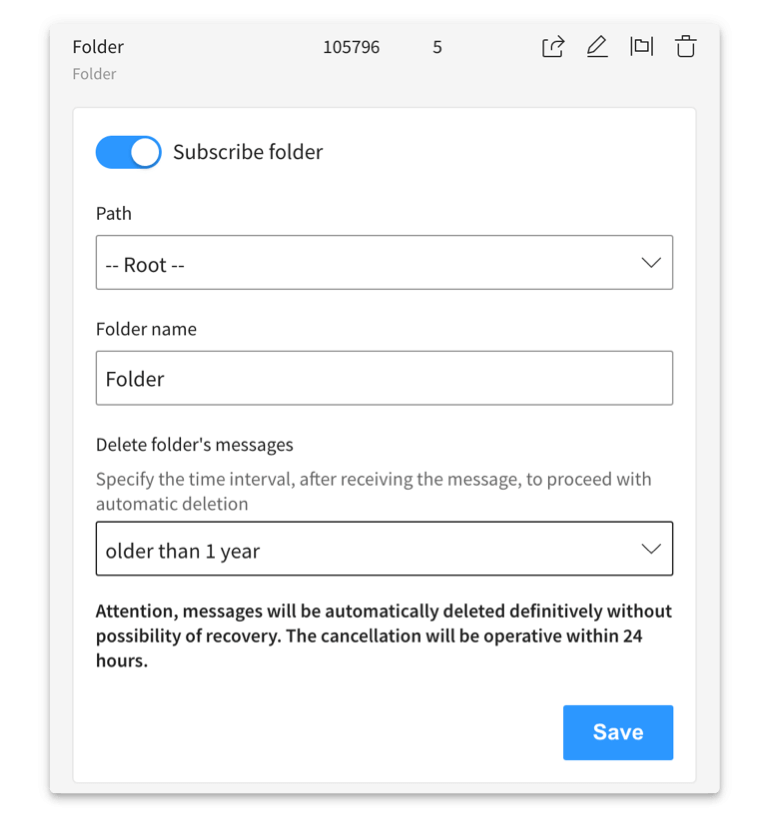
How to set the folder auto cleanup

To set the auto cleanup for a folder, open the Settings page and select the Folders item in the sidebar.

  1. Select the folder on which you want to enable the auto cleanup feature and press the Edit icon.
  2. Set the delete time interval, choose between those available.
  3. Save the changes by clicking the Save button.
Tags:mailprofessional mailbusiness mailprivate mailwebmail

Was this helpful?

Yes  No
Related Articles
  • Two new tools to optimize your inbox
  • How to share folder and collaborate
  • How to retrieve mail from sending
  • How to Configure Browser Notification
  • How to use the search tool
Leave A Comment

You must be logged in to post a comment.

Professional Business Mail
  • Keep your mailbox clean and ordered
  • Two new tools to optimize your inbox
  • How to share folder and collaborate
  • How to retrieve mail from sending
  • How to Configure Browser Notification
  • How to use the search tool
Popular Articles
  • How to install FREE SSL on cPanel
  • How to Install WordPress Online Using Softaculous App Installer
  • Listed Hosting Nameservers
  • How to register a domain, transfer a domain and buy Hosting Plan
  • Enable or Disable PHP’s GD Extension in cPanel
Categories
  • Cloud VPS
  • PHP
  • Migration
  • Resellers
    • WHMCS
    • WHM
  • Security
    • SSL
  • Professional Business Mail
  • Affliates
  • Dedicated Servers
  • Billings & Payments
  • DNS
  • Files & Access
  • Cloudflare
  • cPanel
    • Softaculous
  • Backup
  • Node.js
  • General
  • Domain Reseller
  • Databases
  • WordPress
  • Email
  • Domain
    • Transfer
  • SSD Hosting
  • Nameservers

  How to share folder and collaborate

How to use the search tool  

  • © 2020 - 2024. Listed Hosting. All Rights Reserved.

Popular Search:Reseller Hosting, VPS Hosting, Professional Mail