• Go To Website
  • Go To Website
home/Knowledge Base/Node.js/How To Setup Node.js App in cPanel
Popular Search:Reseller Hosting, VPS Hosting, Professional Mail

How To Setup Node.js App in cPanel

  1. Log into cPanel
  2. Choose Setup Node.js App under Software

 

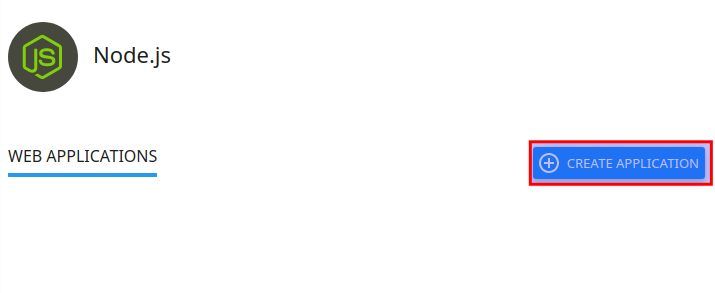
  1. Click Create Application


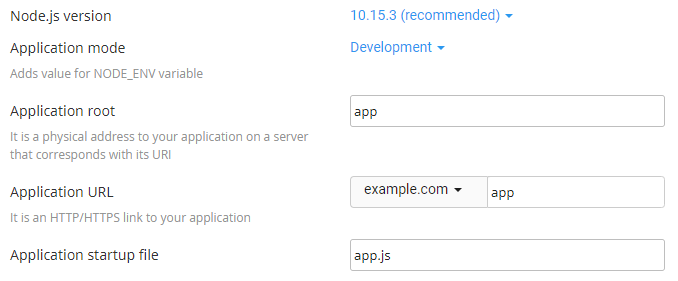
  1. Fill in the Application root field (this is the directory in which you will upload for application files)
  2. Select your Application URL and startup file (if you do not name a startup file, app.js is used as the default)
  3. Fill in the remaining fields with your preferred values
  4. Click Create when ready


Was this helpful?

1 Yes  No
Related Articles
  • Generating Wildcard CSR
  • Using NodeJS Apps
  • How to change cPanel password from your Client Area
  • How to Restore backup using JetBackup5
  • How To Clone A Website In cPanel
  • Setting up DNS records for your domain in CloudFlare
Leave A Comment

You must be logged in to post a comment.

Node.js
  • How To Setup Node.js App in cPanel
  • Using NodeJS Apps
Popular Articles
  • How to install FREE SSL on cPanel
  • How to Install WordPress Online Using Softaculous App Installer
  • Creating addon domains
  • Listed Hosting Nameservers
  • How to register a domain, transfer a domain and buy Hosting Plan
Categories
  • Backup
  • Node.js
  • General
  • Domain Reseller
  • Databases
  • WordPress
  • Email
  • Domain
    • Transfer
  • SSD Hosting
  • Nameservers
  • Cloud VPS
  • PHP
  • Migration
  • Resellers
    • WHM
    • WHMCS
  • Security
    • SSL
  • Professional Business Mail
  • Affliates
  • Dedicated Servers
  • Billings & Payments
  • DNS
  • Files & Access
  • Cloudflare
  • cPanel
    • Softaculous

  How to Update clientexec

How to set up email forwarding in cPanel  

  • © 2020 - 2024. Listed Hosting. All Rights Reserved.

Popular Search:Reseller Hosting, VPS Hosting, Professional Mail